
1 / 9
AV Access Dual Monitor KVM Switch Docking for Laptop Desktop
AED 1,399

Item Details
Age
Brand New
Condition
Perfect inside and out
Usage
Still in original packaging
Warranty
Does not apply
Posted on: 5th April 2026
Description
AV Access Dual Monitor KVM Switch Docking for Laptop & Desktop - Type C Charging, Ethernet, EDID, HDMI & DisplayPort, USB-C MST Dual 4K@60Hz Display, USB 3.0, Full Aluminum Design
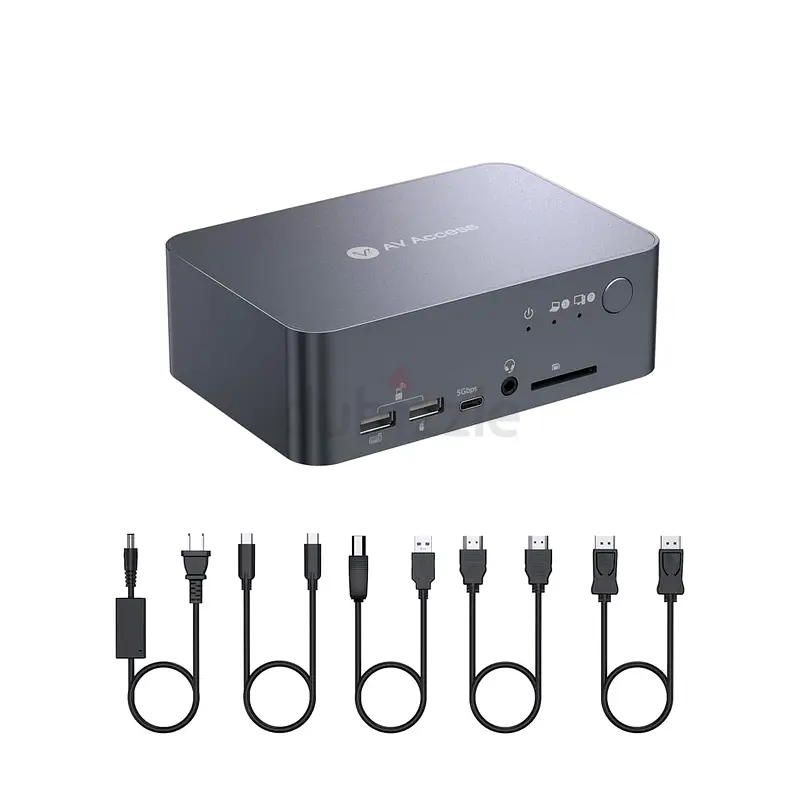
Package list】: 1*Dual Monitor KVM Switch with Docking Station, 1*Power Adapter (20V/6A), 1*USB-C to USB-C cable (USB 3.2 Gen 2, 1m), 1* USB-A to USB-B cable (USB 3.0, 1.5m), 1x HDMI 2.0 cable (1.5m), 1*DisplayPort 1.2a cable (1.5m), 1*User Manual
【Note】: Only support mirrored output on macOS.
【Note】: Please connect the HDMI IN, DP IN and USB-B cable to your desktop.
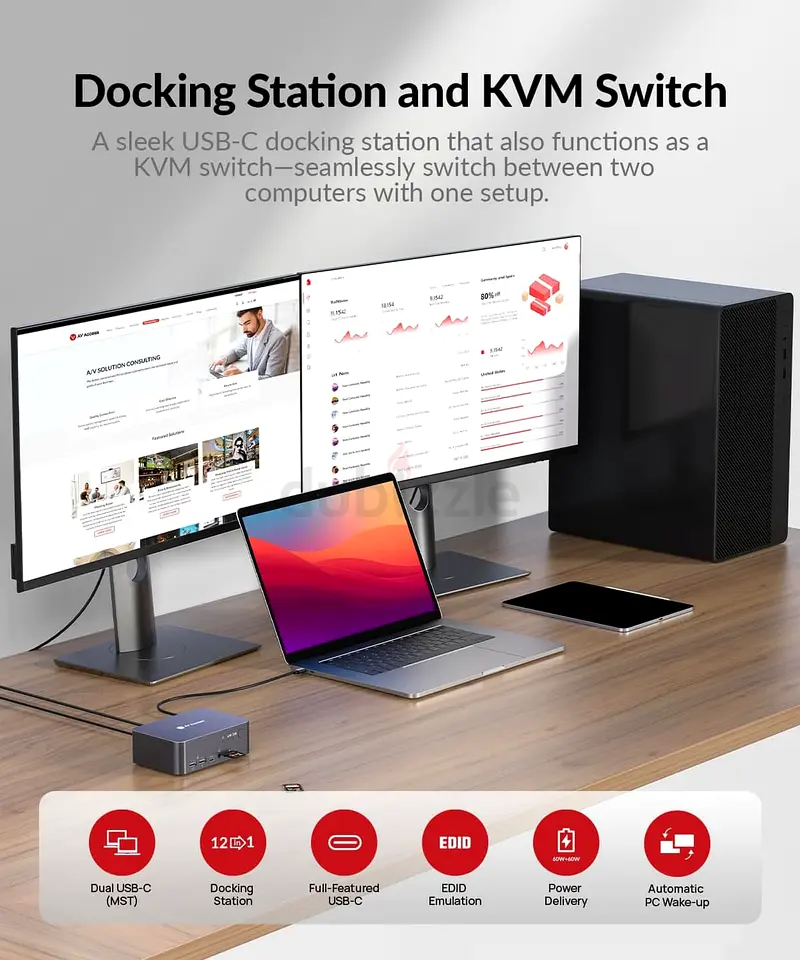
【Versatile 12-in-1 Docking Station】: Connect a variety of peripherals to your two PCs with ease, including 3x USB 3.0, 2x USB 2.0, 1x USB-C, 1x SD card, 1x LAN, 1x Toslink out, 1x 3.5mm headset, and two HDMI outputs. Create a powerful workstation at home.
【KVM Switch Dual Monitor Design】: Fast switching between your gaming PC and workstation with the 1x USB-C (MST) input port for your laptop and 1x integrated HDMI + DisplayPort + USB-B input port for your desktop computer. Enjoy the convenience of switching between work and gaming.
【Outstanding Picture Quality】: Enjoy ultra-high refresh rates with HDMI 2.0, DisplayPort 1.2 & DisplayPort 1.4a (USB-C) compliant. Supports up to 4K@60Hz 4:4:4, while also providing high refresh rates such as 1080P@240Hz/165Hz/144Hz/120Hz, and 2560×1440@144Hz/120Hz, for an exceptional gaming experience.
【Full-Featured USB-C】: Transfer data up to 20Gbp/s with the USB-C port while charging your laptop with up to 60W. Pass dual 4K UHD videos without any hassle.
【Fast & Efficient Switching】: Save time with the automatic PC wake-up function and EDID simulation that ensures fast switching between your PC sources, taking only 2-3 seconds. Use the front control button for effortless switching between your devices.
【1-year Free Replacement Warranty】: AV Access is very confident in this KVM Docking as it offers them a 1-year warranty, 1-month free replacement, and lifetime after-sale support guarantee. If you have any questions about it, just take a little time to email us, we promise to offer you a 100% satisfactory solution.
From the brand iDock Series No Latency Extenders Best Selling KVM Switch Renovate Your Hybrid Life Dual Monitor KVM Switch KVM HDMI Extenders Other Products from AV Access Review: I'd be lost without it - Working form home with a personal desktop PC and my work laptop this KVM is a $%& send. Simplifies all the connections needed for all my inputs/outputs into one and allows me to quickly switch between them with one button press. previously I used a couple of docking stations, one that required me to physically change the wire from the Laptop to the PC and the other which had 2 set of each wire one set connecting to my PC and the other to my Laptop. This IDock consolidates all of these connections to one device including the ethernet connection. sleek design, light but sturdy, compact but not crowded. No noise or over heating (gets slightly warm but that's understandable) I've not had any major issues since purchasing it and any questions I have had have been quickly answered by the AV access support team. All the wires required are included with the product. It's a bit pricey but worth every penny, I've probably spent more over the years with all the other solutions I have tried, and $%& knows how much time this has saved me as switching from one to the other, which I do at least twice a day, takes less than 3 seconds. Wish I had found this sooner! ps. check out the other docks AV access sell as they have a range for all the different setups you might have. Review: Exactly what I needed - This has been a life saver for me - I have two monitors, a work laptop, and a home PC. I’m able to use both monitors with the laptop, then at the end of a work day I can switch to use the PC on both monitors by just pushing one button. It’s exactly what I needed, so easy to use and set up, and it has many USB A ports for my keyboard and mouse that I can also use on both computers depending on which one I’m switched to. It’s not cheap, but it’s absolutely worth it in my opinion. I’ve had mine for almost 2 years and use it regularly, still working like a charm.
Package list】: 1*Dual Monitor KVM Switch with Docking Station, 1*Power Adapter (20V/6A), 1*USB-C to USB-C cable (USB 3.2 Gen 2, 1m), 1* USB-A to USB-B cable (USB 3.0, 1.5m), 1x HDMI 2.0 cable (1.5m), 1*DisplayPort 1.2a cable (1.5m), 1*User Manual
【Note】: Only support mirrored output on macOS.
【Note】: Please connect the HDMI IN, DP IN and USB-B cable to your desktop.
【Versatile 12-in-1 Docking Station】: Connect a variety of peripherals to your two PCs with ease, including 3x USB 3.0, 2x USB 2.0, 1x USB-C, 1x SD card, 1x LAN, 1x Toslink out, 1x 3.5mm headset, and two HDMI outputs. Create a powerful workstation at home.
【KVM Switch Dual Monitor Design】: Fast switching between your gaming PC and workstation with the 1x USB-C (MST) input port for your laptop and 1x integrated HDMI + DisplayPort + USB-B input port for your desktop computer. Enjoy the convenience of switching between work and gaming.
【Outstanding Picture Quality】: Enjoy ultra-high refresh rates with HDMI 2.0, DisplayPort 1.2 & DisplayPort 1.4a (USB-C) compliant. Supports up to 4K@60Hz 4:4:4, while also providing high refresh rates such as 1080P@240Hz/165Hz/144Hz/120Hz, and 2560×1440@144Hz/120Hz, for an exceptional gaming experience.
【Full-Featured USB-C】: Transfer data up to 20Gbp/s with the USB-C port while charging your laptop with up to 60W. Pass dual 4K UHD videos without any hassle.
【Fast & Efficient Switching】: Save time with the automatic PC wake-up function and EDID simulation that ensures fast switching between your PC sources, taking only 2-3 seconds. Use the front control button for effortless switching between your devices.
【1-year Free Replacement Warranty】: AV Access is very confident in this KVM Docking as it offers them a 1-year warranty, 1-month free replacement, and lifetime after-sale support guarantee. If you have any questions about it, just take a little time to email us, we promise to offer you a 100% satisfactory solution.
From the brand iDock Series No Latency Extenders Best Selling KVM Switch Renovate Your Hybrid Life Dual Monitor KVM Switch KVM HDMI Extenders Other Products from AV Access Review: I'd be lost without it - Working form home with a personal desktop PC and my work laptop this KVM is a $%& send. Simplifies all the connections needed for all my inputs/outputs into one and allows me to quickly switch between them with one button press. previously I used a couple of docking stations, one that required me to physically change the wire from the Laptop to the PC and the other which had 2 set of each wire one set connecting to my PC and the other to my Laptop. This IDock consolidates all of these connections to one device including the ethernet connection. sleek design, light but sturdy, compact but not crowded. No noise or over heating (gets slightly warm but that's understandable) I've not had any major issues since purchasing it and any questions I have had have been quickly answered by the AV access support team. All the wires required are included with the product. It's a bit pricey but worth every penny, I've probably spent more over the years with all the other solutions I have tried, and $%& knows how much time this has saved me as switching from one to the other, which I do at least twice a day, takes less than 3 seconds. Wish I had found this sooner! ps. check out the other docks AV access sell as they have a range for all the different setups you might have. Review: Exactly what I needed - This has been a life saver for me - I have two monitors, a work laptop, and a home PC. I’m able to use both monitors with the laptop, then at the end of a work day I can switch to use the PC on both monitors by just pushing one button. It’s exactly what I needed, so easy to use and set up, and it has many USB A ports for my keyboard and mouse that I can also use on both computers depending on which one I’m switched to. It’s not cheap, but it’s absolutely worth it in my opinion. I’ve had mine for almost 2 years and use it regularly, still working like a charm.
Location
Al Taawun, Sharjah, UAE

- Accounting / Finance
- Automobile
- Beauty / Salon
- Cleaner / Housekeeper
- Construction
- Cook / Chef
- Customer Service / Call Centre
- Data Management & Analysis
- Design
- Driver / Delivery
- Education
- Engineering
- Event Management & Operations
- Handyman / Technician
- HR / Admin
- Information Technology
- Legal Services
- Logistics & Distribution
- Manufacturing / Warehouse
- Marine Captain / Crew
- Marketing / Advertising
- Media, Art & Entertainment
- Medical / Healthcare
- Real Estate
- Restaurant Operations
- Sales / Business Development
- Secretarial / Front Office
- Security / Guard
- Sports & Fitness
- Travel & Hospitality
- Others
- Jobs Wanted
- Electronics
- Computers & Networking
- Business & Industrial
- Home Appliances
- Sports Equipment
- Clothing & Accessories
- Cameras & Imaging
- Jewelry & Watches
- Pets
- Musical Instruments
- Gaming
- Baby Items
- Toys
- Tickets & Vouchers
- Collectibles
- Books
- Music
- Free Stuff
- Lost/Found
- DVDs & Movies
- Furniture, Home & Garden
- Mobile Phones & Tablets
العربية